PowerShell 查看电脑开关机记录
PowerShell 查看电脑开关机记录
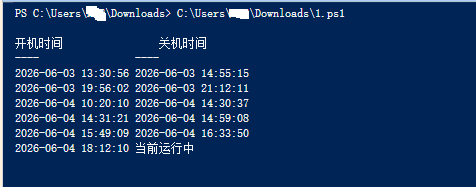
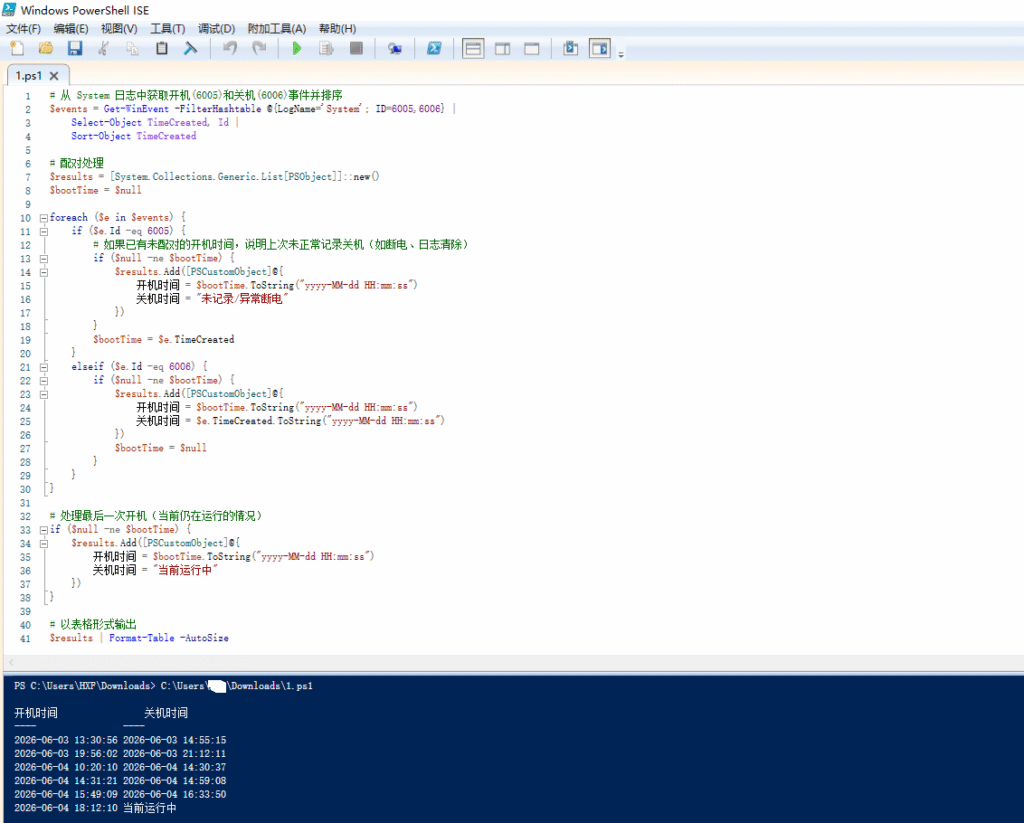
# 从 System 日志中获取开机(6005)和关机(6006)事件并排序
$events = Get-WinEvent -FilterHashtable @{LogName='System'; ID=6005,6006} |
    Select-Object TimeCreated, Id |
    Sort-Object TimeCreated

# 配对处理
$results = [System.Collections.Generic.List[PSObject]]::new()
$bootTime = $null

foreach ($e in $events) {
    if ($e.Id -eq 6005) {
        # 如果已有未配对的开机时间,说明上次未正常记录关机(如断电、日志清除)
        if ($null -ne $bootTime) {
            $results.Add([PSCustomObject]@{
                开机时间 = $bootTime.ToString("yyyy-MM-dd HH:mm:ss")
                关机时间 = "未记录/异常断电"
            })
        }
        $bootTime = $e.TimeCreated
    }
    elseif ($e.Id -eq 6006) {
        if ($null -ne $bootTime) {
            $results.Add([PSCustomObject]@{
                开机时间 = $bootTime.ToString("yyyy-MM-dd HH:mm:ss")
                关机时间 = $e.TimeCreated.ToString("yyyy-MM-dd HH:mm:ss")
            })
            $bootTime = $null
        }
    }
}

# 处理最后一次开机(当前仍在运行的情况)
if ($null -ne $bootTime) {
    $results.Add([PSCustomObject]@{
        开机时间 = $bootTime.ToString("yyyy-MM-dd HH:mm:ss")
        关机时间 = "当前运行中"
    })
}

# 以表格形式输出
$results | Format-Table -AutoSize
 中文(简体)
 中文(繁體)
 日本語
日本語 한국어
한국어 русский
 English
 français
 Deutsch
 español
 italiano
 বাংলা (ভারত)
 العربية
 ไทย
ไทย Tiếng Việt
 Bahasa Melayu
 Filipino
 ελληνικά
 magyar
 dansk
dansk norsk
norsk íslenska
 Gaeilge