钉钉开发结合ExcelVBA实现批量推送信息
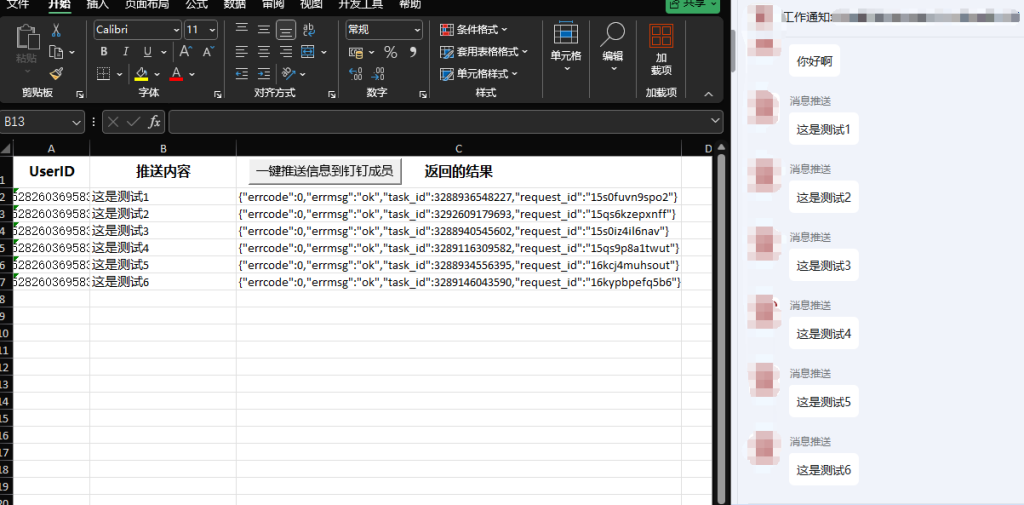
基于钉钉开放平台,创建应用,授权成员信息读权限,调用企业API基础权限,通过Excel VBA调用api接口实现企业内部批量推送信息。代码基于当前工作表的a列和b列中的数据发起推送,并回写推送结果到c列,其中a列是userid,b列是要推送的内容,第一行为标题行。
需要注意的地方:除了示例代码外这里需要引用一个JSON解析器,这里直接提供附件,需要手工引入到VBA项目。除此之外还需要在 VBA 编辑器中点击”工具” > “引用”,勾选”Microsoft Scripting Runtime”。
执行结果演示,左边是excel表,右边是钉钉收到的工作通知。
以下是示例代码:
Option Explicit

' 钉钉配置(替换为你自己的值)
Private Const APP_KEY As String = "你的AppKey"
Private Const APP_SECRET As String = "你的AppSecret"
Private Const AGENT_ID As String = "你的AgentId"

Private Function GetAccessToken() As String
    Dim url As String
    Dim http As Object
    Dim response As String
    Dim json As Object

    On Error GoTo ErrorHandler

    Set http = CreateObject("MSXML2.XMLHTTP")
    url = "https://oapi.dingtalk.com/gettoken?appkey=" & APP_KEY & "&appsecret=" & APP_SECRET

    With http
        .Open "GET", url, False
        .send
        response = .responseText
    End With

    Set json = ParseJson(response)

    If json.Exists("access_token") Then
        GetAccessToken = json("access_token")
    Else
        MsgBox "获取access_token失败: " & response, vbExclamation
        GetAccessToken = ""
    End If

    Exit Function

ErrorHandler:
    MsgBox "获取access_token时出错: " & Err.Description, vbExclamation
    GetAccessToken = ""
End Function

Private Function SendDingTalkMessage(userid As String, content As String, token As String) As String
    Dim url As String
    Dim http As Object
    Dim requestBody As String
    Dim response As String

    On Error GoTo ErrorHandler

    Set http = CreateObject("MSXML2.XMLHTTP")
    url = "https://oapi.dingtalk.com/topapi/message/corpconversation/asyncsend_v2?access_token=" & token

    requestBody = "{"
    requestBody = requestBody & """agent_id"": """ & AGENT_ID & ""","
    requestBody = requestBody & """userid_list"": """ & userid & ""","
    requestBody = requestBody & """msg"": {"
    requestBody = requestBody & """msgtype"": ""text"","
    requestBody = requestBody & """text"": {""content"": """ & content & """}"
    requestBody = requestBody & "}"
    requestBody = requestBody & "}"

    With http
        .Open "POST", url, False
        .setRequestHeader "Content-Type", "application/json"
        .send requestBody
        response = .responseText
    End With

    SendDingTalkMessage = response
    Exit Function

ErrorHandler:
    MsgBox "发送消息时出错: " & Err.Description, vbExclamation
    SendDingTalkMessage = "{""errcode"": -1, ""errmsg"": """ & Err.Description & """}"
End Function

Public Sub PushFromExcel()
    Dim ws As Worksheet
    Dim lastRow As Long
    Dim i As Long
    Dim userid As String
    Dim content As String
    Dim token As String
    Dim result As String

    On Error GoTo ErrorHandler

    Application.ScreenUpdating = False
    Application.DisplayAlerts = False

    Set ws = ActiveSheet

    lastRow = ws.Cells(ws.Rows.Count, "A").End(xlUp).Row

    token = GetAccessToken()
    If token = "" Then Exit Sub

    For i = 2 To lastRow
        userid = CStr(ws.Cells(i, 1).Value)
        content = CStr(ws.Cells(i, 2).Value)

        If content = "" Then content = "(空内容)"

        Debug.Print "准备推送 -> UserID: '" & userid & "', 内容: '" & content & "'"

        result = SendDingTalkMessage(userid, content, token)
        ws.Cells(i, 3).Value = result

        Application.Wait Now + TimeValue("00:00:01")
    Next i

    MsgBox "处理完成!共推送 " & lastRow - 1 & " 条消息。", vbInformation

    Exit Sub

ErrorHandler:
    Application.ScreenUpdating = True
    Application.DisplayAlerts = True
    MsgBox "处理过程中出错: " & Err.Description, vbExclamation
End Sub

Private Function ParseJson(ByVal JsonString As String) As Object
    Set ParseJson = JsonConverter.ParseJson(JsonString)
End Function

 中文(简体)
 中文(繁體)
 日本語
日本語 한국어
한국어 русский
 English
 français
 Deutsch
 español
 italiano
 বাংলা (ভারত)
 العربية
 ไทย
ไทย Tiếng Việt
 Bahasa Melayu
 Filipino
 ελληνικά
 magyar
 dansk
dansk norsk
norsk íslenska
 Gaeilge