CF前端+钉钉后端实现扫码一键挪车实时推送消息到钉钉
之前看到有人做了个基于微信第三方公众号的挪车提醒,但公众号限制,目前没法实现实时提醒,所以试着搞了个钉钉的版本。前端使用CF,后端使用钉钉开放平台,创建应用,授权成员信息读权限,调用企业API基础权限,通过代码调用API接口实现推送信息。可绑定自定义域名,至于二维码有很多平台可以生成。本站 服务-IT工具 中也可以生成。
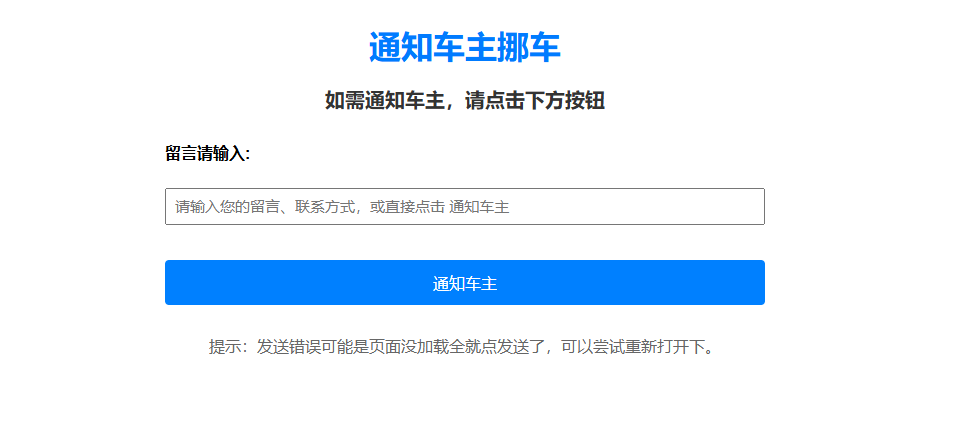
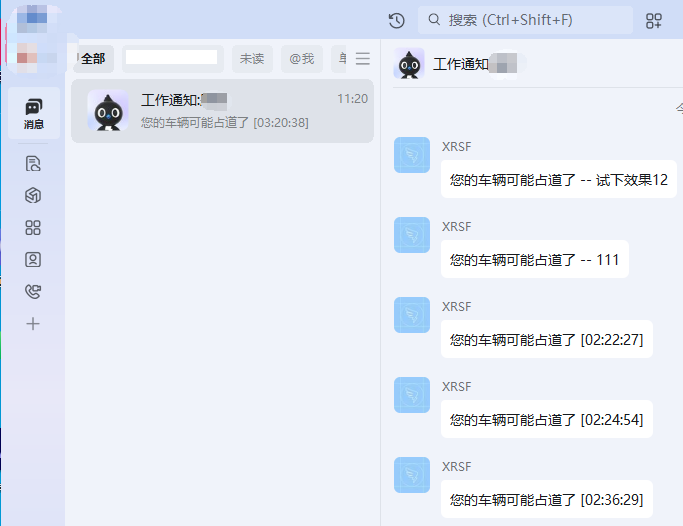
基于客户端Cookie计时,带时间戳版本,时区使用(UTC+8)即北京时间,加时间戳的目的是确保每条消息文本内容不一样避免被钉钉的反垃圾拦截。
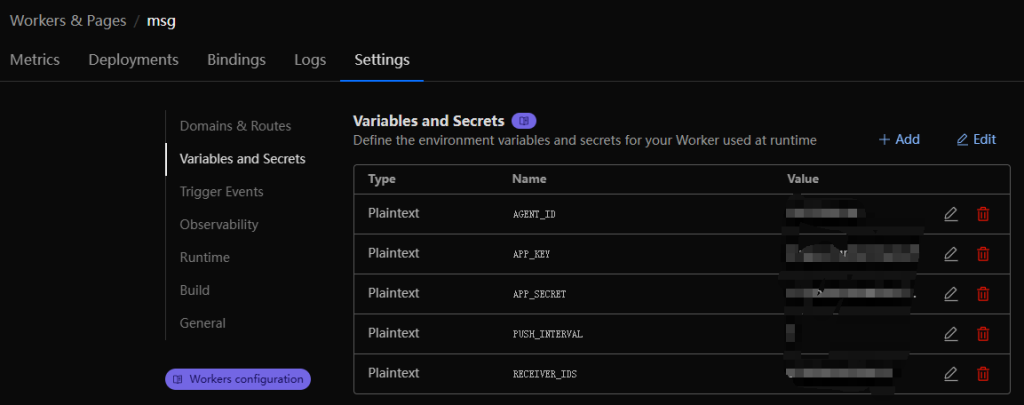
部署是需要用到这5个环境变量:
APP_KEY – 开放平台应用的AppKey
APP_SECRET – 开放平台应用的AppSecret
AGENT_ID – 应用详情页中的AgentId
RECEIVER_IDS – 接收人钉钉ID,多个时用逗号分隔,如:user001,user002,user003
PUSH_INTERVAL – 推送间隔时间(分钟),设为0表示不限制
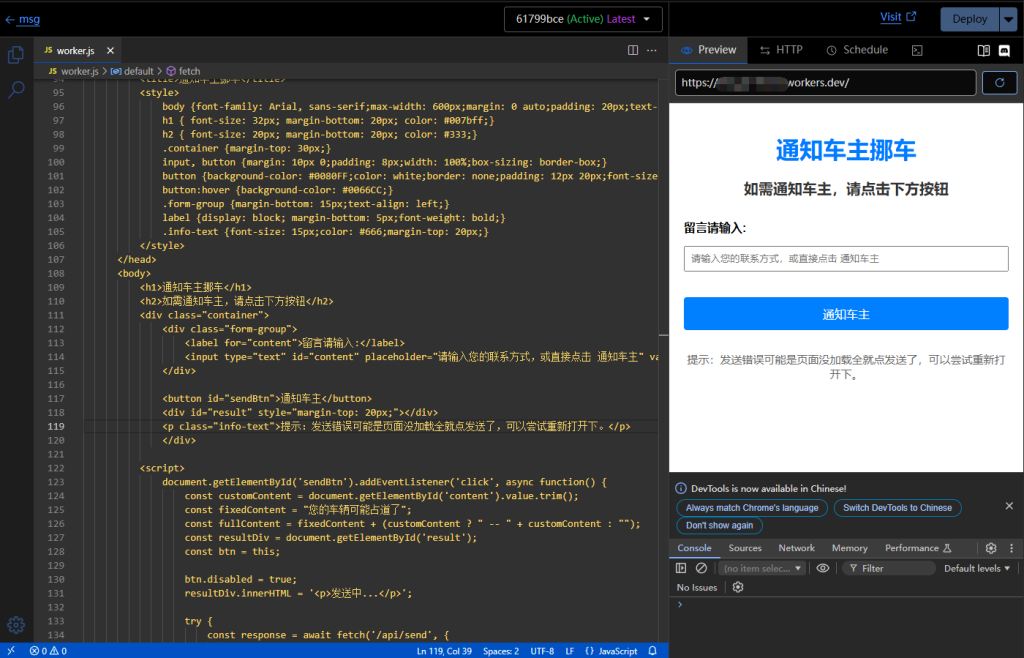
以下是代码
export default {
  async fetch(request, env, context) {
    const url = new URL(request.url);

    // 处理API请求
    if (url.pathname === '/api/send' && request.method === 'POST') {
      try {
        const pushInterval = parseInt(env.PUSH_INTERVAL || "0") * 60; // 转换为秒
        const now = Math.floor(Date.now() / 1000); // 当前时间戳(秒)

        // 检查Cookie中的上次推送时间
        const cookie = request.headers.get('Cookie') || '';
        const lastPushMatch = cookie.match(/last_push=(\d+)/);

        if (pushInterval > 0 && lastPushMatch) {
          const lastPush = parseInt(lastPushMatch[1]);
          const remainingTime = pushInterval - (now - lastPush);

          if (remainingTime > 0) {
            const remainingMinutes = Math.floor(remainingTime / 60);
            const remainingSeconds = remainingTime % 60;

            return new Response(JSON.stringify({
              errcode: -2,
              errmsg: `操作过于频繁,请${remainingMinutes}:${remainingSeconds.toString().padStart(2, '0')}后再试`
            }), {
              status: 429,
              headers: {
                'Content-Type': 'application/json',
                'Set-Cookie': `last_push=${lastPush}; Path=/; Max-Age=${pushInterval}`
              }
            });
          }
        }

        // 获取access_token
        const token = await getAccessToken(env);
        if (!token) {
          return new Response(JSON.stringify({
            errcode: -1,
            errmsg: "获取access_token失败"
          }), {
            status: 500,
            headers: { 'Content-Type': 'application/json' }
          });
        }

        // 解析请求参数
        const { content = "" } = await request.json();
        const userIds = env.RECEIVER_IDS.split(',').map(id => id.trim()).filter(id => id);
        if (userIds.length === 0) {
          return new Response(JSON.stringify({
            errcode: -1,
            errmsg: "环境变量中未配置有效的接收人ID"
          }), {
            status: 400,
            headers: { 'Content-Type': 'application/json' }
          });
        }

        // 发送消息
        const result = await sendDingTalkMessage(userIds, content, token, env);

        // 设置Cookie记录本次推送时间
        const responseHeaders = {
          'Content-Type': 'application/json'
        };

        if (result.errcode === 0) {
          responseHeaders['Set-Cookie'] = `last_push=${now}; Path=/; Max-Age=${pushInterval}`;
        }

        return new Response(JSON.stringify(result), {
          headers: responseHeaders
        });
      } catch (error) {
        return new Response(JSON.stringify({
          errcode: -1,
          errmsg: error.message
        }), {
          status: 500,
          headers: { 'Content-Type': 'application/json' }
        });
      }
    }

    // 返回HTML页面
    return new Response(`
      <!DOCTYPE html>
      <html lang="zh-CN">
      <head>
          <meta charset="UTF-8">
          <meta name="viewport" content="width=device-width, initial-scale=1.0">
          <title>挪车通知</title>
          <style>
              body {
                  font-family: Arial, sans-serif;
                  max-width: 600px;
                  margin: 0 auto;
                  padding: 20px;
                  text-align: center;
              }
              h2 {
                  color: #333;
              }
              .container {
                  margin-top: 30px;
              }
              input, button {
                  margin: 10px 0;
                  padding: 8px;
                  width: 100%;
                  box-sizing: border-box;
              }
              button {
                  background-color: #0080FF;
                  color: white;
                  border: none;
                  padding: 12px 20px;
                  font-size: 16px;
                  cursor: pointer;
                  border-radius: 4px;
              }
              button:hover {
                  background-color: #0066CC;
              }
              .form-group {
                  margin-bottom: 15px;
                  text-align: left;
              }
              label {
                  display: block;
                  margin-bottom: 5px;
                  font-weight: bold;
              }
              .info-text {
                  font-size: 14px;
                  color: #666;
                  margin-top: 20px;
              }
          </style>
      </head>
      <body>
          <h2>如需通知车主,请点击下方按钮</h2>
          <div class="container">
              <div class="form-group">
                  <label for="content">留言请输入:</label>
                  <input type="text" id="content" placeholder="请输入您的联系方式,或直接点击 通知车主" value="">
              </div>

              <button id="sendBtn">通知车主</button>
              <div id="result" style="margin-top: 20px;"></div>
          </div>

          <script>
              document.getElementById('sendBtn').addEventListener('click', async function() {
                  const customContent = document.getElementById('content').value.trim();
                  const fixedContent = "您的车辆可能占道了";
                  const fullContent = fixedContent + (customContent ? " -- " + customContent : "");
                  const resultDiv = document.getElementById('result');
                  const btn = this;

                  btn.disabled = true;
                  resultDiv.innerHTML = '<p>发送中...</p>';

                  try {
                      const response = await fetch('/api/send', {
                          method: 'POST',
                          headers: {
                              'Content-Type': 'application/json'
                          },
                          body: JSON.stringify({
                              content: fullContent
                          }),
                          credentials: 'include' // 确保发送Cookie
                      });

                      const result = await response.json();

                      if (result.errcode === 0) {
                          resultDiv.innerHTML = '<p style="color:green;">消息推送成功!</p>';
                      } else if (result.errcode === -2) {
                          resultDiv.innerHTML = '<p style="color:orange;">' + result.errmsg + '</p>';
                      } else {
                          resultDiv.innerHTML = '<p style="color:red;">消息推送失败: ' + (result.errmsg || '未知错误') + '</p>';
                      }
                  } catch (error) {
                      resultDiv.innerHTML = '<p style="color:red;">请求出错: ' + error.message + '</p>';
                  } finally {
                      btn.disabled = false;
                  }
              });
          </script>
      </body>
      </html>
    `, {
      headers: {
        'Content-Type': 'text/html; charset=utf-8'
      }
    });
  }
}

// 获取钉钉access_token
async function getAccessToken(env) {
  const tokenUrl = `https://oapi.dingtalk.com/gettoken?appkey=${env.APP_KEY}&appsecret=${env.APP_SECRET}`;

  const response = await fetch(tokenUrl);
  const data = await response.json();

  return data.access_token || null;
}

// 发送工作通知(添加东八区时间戳确保唯一性)
async function sendDingTalkMessage(userIds, content, token, env) {
  const apiUrl = `https://oapi.dingtalk.com/topapi/message/corpconversation/asyncsend_v2?access_token=${token}`;

  // 获取东八区时间 (UTC+8)
  const now = new Date();
  const utc8Offset = 8 * 60 * 60 * 1000; // 8小时的毫秒数
  const beijingTime = new Date(now.getTime() + utc8Offset);

  // 格式化为HH:MM:SS
  const hours = String(beijingTime.getUTCHours()).padStart(2, '0');
  const minutes = String(beijingTime.getUTCMinutes()).padStart(2, '0');
  const seconds = String(beijingTime.getUTCSeconds()).padStart(2, '0');
  const timeStamp = `${hours}:${minutes}:${seconds}`;

  // 在原始内容后添加时间戳
  const uniqueContent = `${content} [${timeStamp}]`;

  const message = {
    agent_id: env.AGENT_ID,
    userid_list: userIds.join(','),
    msg: {
      msgtype: "text",
      text: {
        content: uniqueContent
      }
    }
  };

  const response = await fetch(apiUrl, {
    method: 'POST',
    headers: {
      'Content-Type': 'application/json'
    },
    body: JSON.stringify(message)
  });

  return await response.json();
}
 中文(简体)
 中文(繁體)
 日本語
日本語 한국어
한국어 русский
 English
 français
 Deutsch
 español
 italiano
 বাংলা (ভারত)
 العربية
 ไทย
ไทย Tiếng Việt
 Bahasa Melayu
 Filipino
 ελληνικά
 magyar
 dansk
dansk norsk
norsk íslenska
 Gaeilge